
You choose an application or solution from the catalogue, and RAD provisions it into a Google Cloud project — one you already own, or one RAD creates and governs for you.
Five steps. No need to write infrastructure code.
These five describe choosing an entry yourself. The other way in is Build Solution with AI, which asks four questions in ordinary words — what people should be able to do, where it should run, where in the world, and what to call it — then composes and prices a set of applications and seeds this same form with those answers. It discovers and quotes; it does not deploy by a second path, and it hands over to the full form as soon as something genuinely needs you, such as an application that wants a credential.
The quote covers the chain rather than the entry. One application deploy is often more than one deployment — a shared foundation may have to be created first — so the estimate prices the whole chain in a single call and separates what is charged now from what is metered as the build runs. Where a minimum balance applies it is shown as money you must hold, never added to the total as money you spend.
The catalogue holds 350+ deployment options covering 190+ applications and platform modules. Most applications ship in both a Cloud Run and a GKE variant.
Use the Configuration Form, or tell the Conversational Assistant what you want; both write the same settings. The Conversational Assistant comes with purchased credits; it proposes settings for you to apply, and refuses a region a RAD-managed project cannot use. A first deployment is Basic; the full set opens on update, once you buy credits.
The confirmation prices the whole chain, including any project and shared services RAD creates first, rounded up to what is charged. A failed deployment is currently not charged.
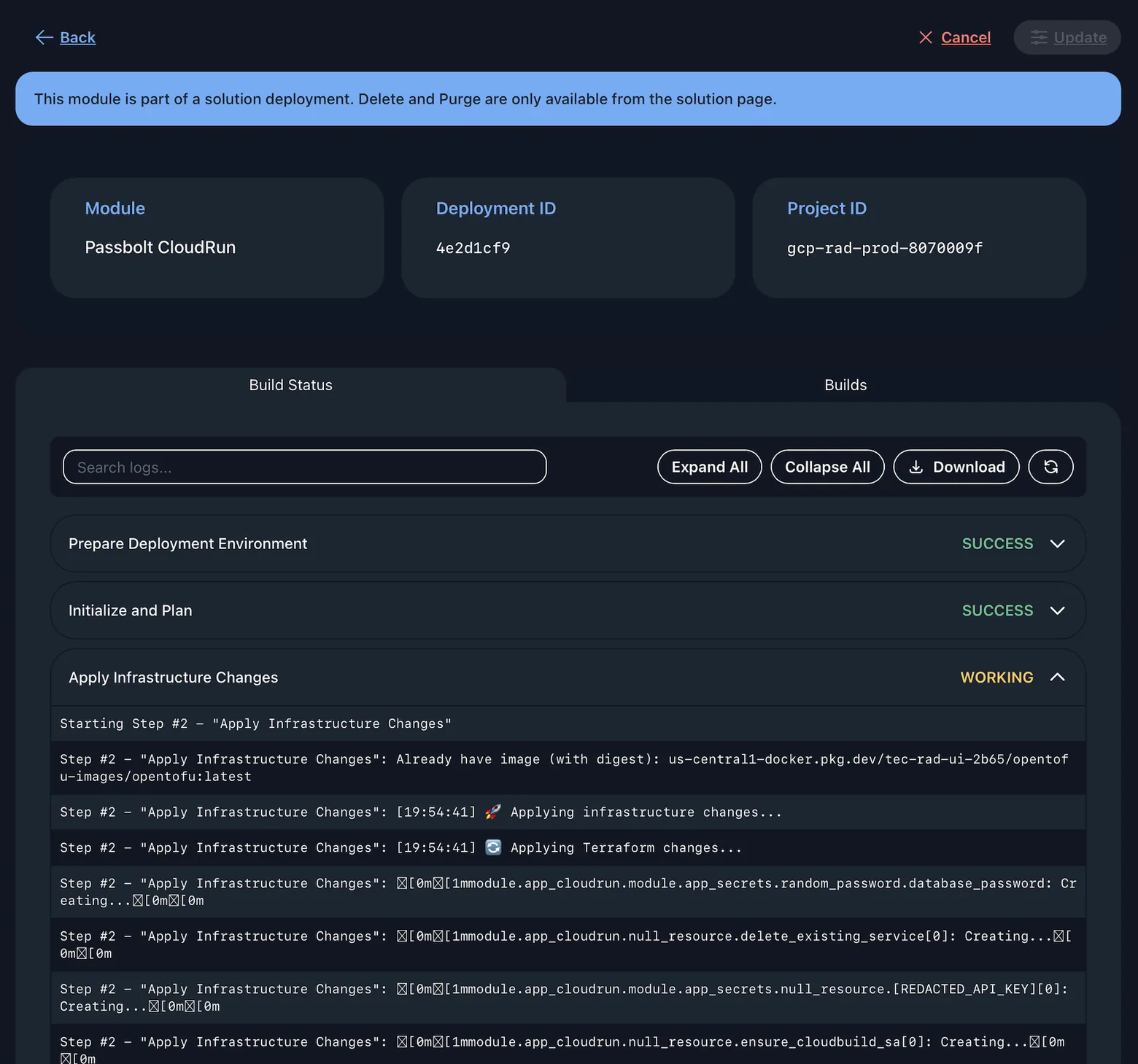
RAD runs Terraform as a provisioning job against your project. Build logs stream into the console while it runs, enabling users to view status in realtime.
The module's Terraform outputs are published against the deployment. The state is not: it lives in RAD's own Cloud Storage bucket from where updates can be performed.
Each form is generated from the module's own Terraform, so what it accepts is what that module accepts. Three checks run before anything is queued.
Where a module declares a rule for a field — a naming pattern, a length limit — the form enforces it as you type and shows the module's own message. You meet it before the build rather than several minutes into one.
A value the target project's quota cannot satisfy is refused when the form is submitted, on create and on update. The alternative is an apply that runs for minutes and then stops on a limit that was knowable at the start.
A field the module marks sensitive is masked and written to Google Secret Manager instead of being stored with the rest of the configuration. On update it reads Configured or Not configured; leaving a configured one blank keeps it.
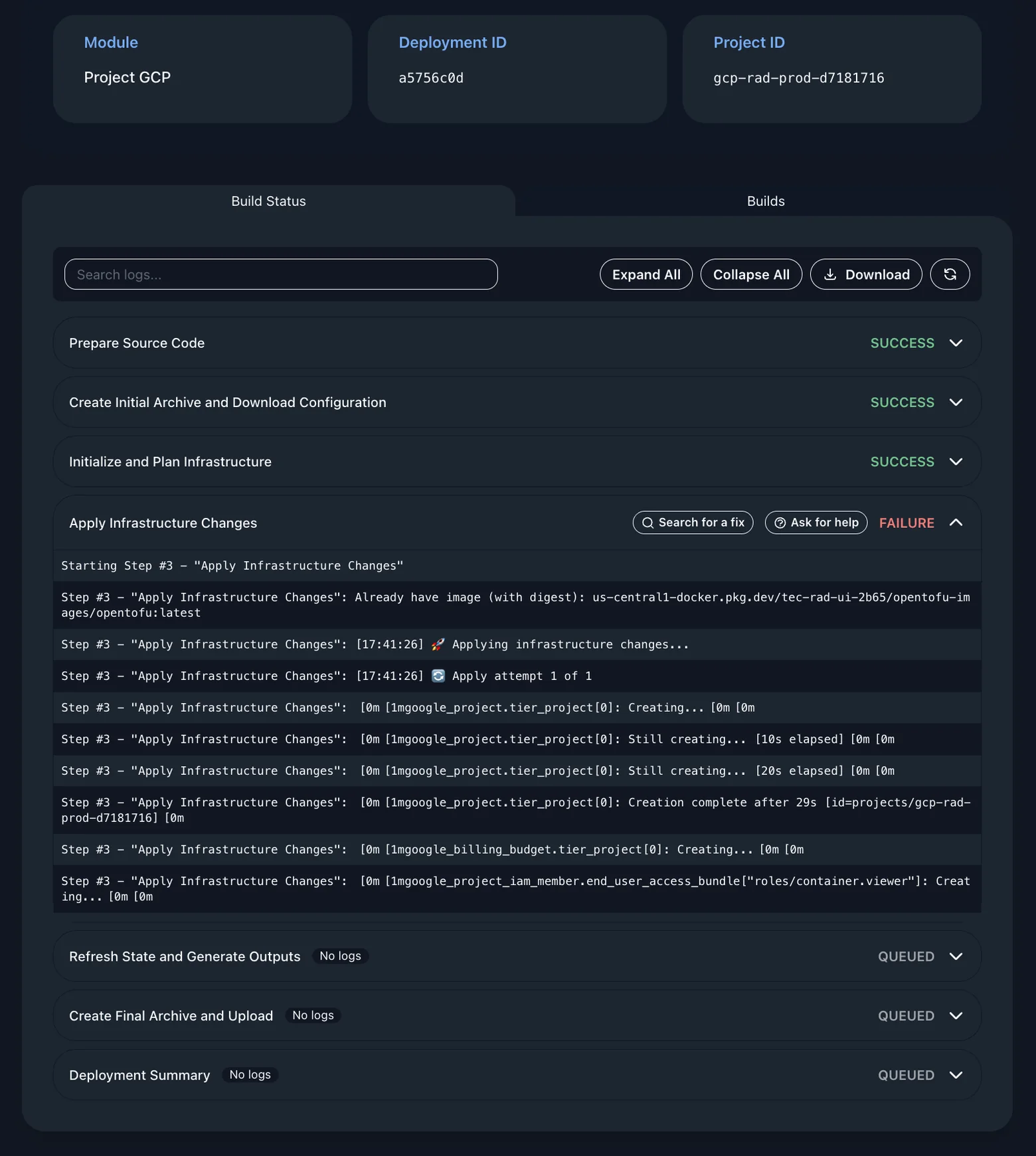
The stage that broke is marked, the stages after it stay queued rather than running against a half-built foundation, and the Terraform output that produced the error sits underneath it. The whole log is searchable and downloadable.
Opens a Google AI Mode search already seeded with that step's own error output, so you are not copying a stack trace into a search box or describing it from memory.
Raises a support ticket with the failure context attached. One route is instant and self-service, the other reaches a person; which you want depends on how legible the error is.
A deployment you cancelled yourself does not offer either action, because there is nothing to look up. They appear on a step that genuinely failed.
A row of green SUCCESS marks tells you the build worked. It does not tell you what now exists in your Google Cloud project, and most people deploying through RAD do not read Terraform. One button answers that.
Opens a plain-English explanation of the Google Cloud resources the deployment created, and what they cost to run. It works from what the build actually did — Terraform's own added, changed and destroyed counts, and a tally of each kind of resource — not from a guess about what the module usually does.
It sends the kinds of resource and how many of each. Your project ID, resource names, service account and user email addresses, and every configured value stay behind. The question is answered by the shape of the estate, so the identifiers never need to travel.
Of the six stages in a build, only the apply has anything to say — the rest fetch code and move archives. A button on every stage would return five shrugs and one answer, so there is one, for the build.
A deployment is not a one-way door. Three actions cover its lifecycle, and one of them is the exit.
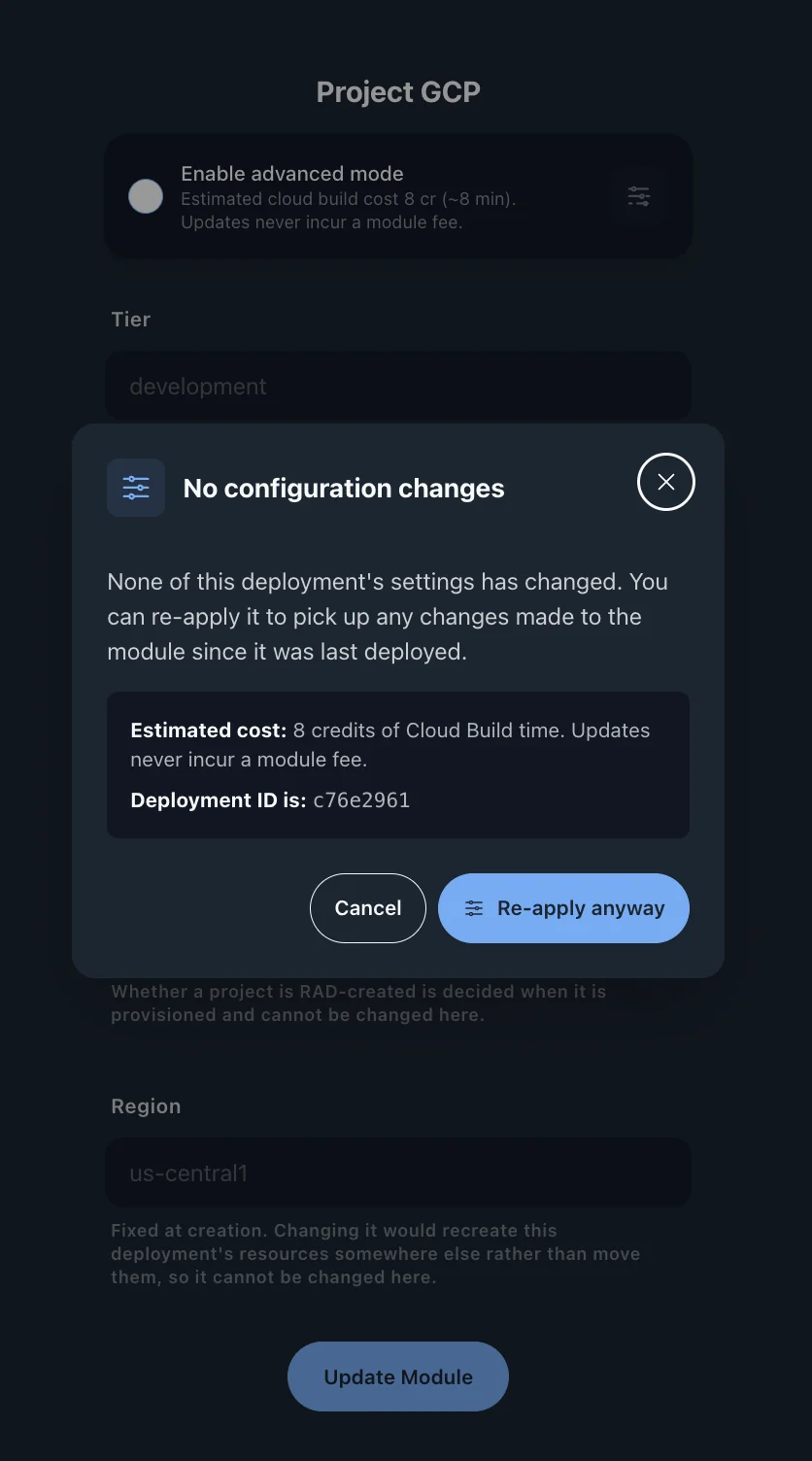
Change the module's configuration and re-apply. Terraform plans and applies the difference rather than rebuilding from scratch, so what is already running is left where it is. The build cost of the update is metered.
Some fields cannot change without rebuilding what they created, so changing one raises a confirmation before anything runs. An administrator can instead make those fields read-only while a deployment is running.
Destroys the cloud resources the module created, in dependency order. A shared project and its services stay while anything else uses them; deleting the last application asks whether to remove them too.
Removes RAD's record of the deployment and its Terraform state, and runs no Terraform. In a project you own you can purge while the infrastructure keeps running; in a RAD-managed project the delete has to finish first, because those resources bill RAD.
An update inherits the state of everything the deployment depends on. Two of those states are handled differently, and the difference is the point.
Where this deployment depends on one that failed, was cancelled or timed out, RAD names them in a "Start these first" panel and leaves the submit button disabled until they succeed. Fixing the prerequisite itself is never blocked.
That update is accepted rather than refused, and released once the prerequisite finishes. A dependency in flight is not a fault, so it is not reported as one and you do not have to come back and resubmit.
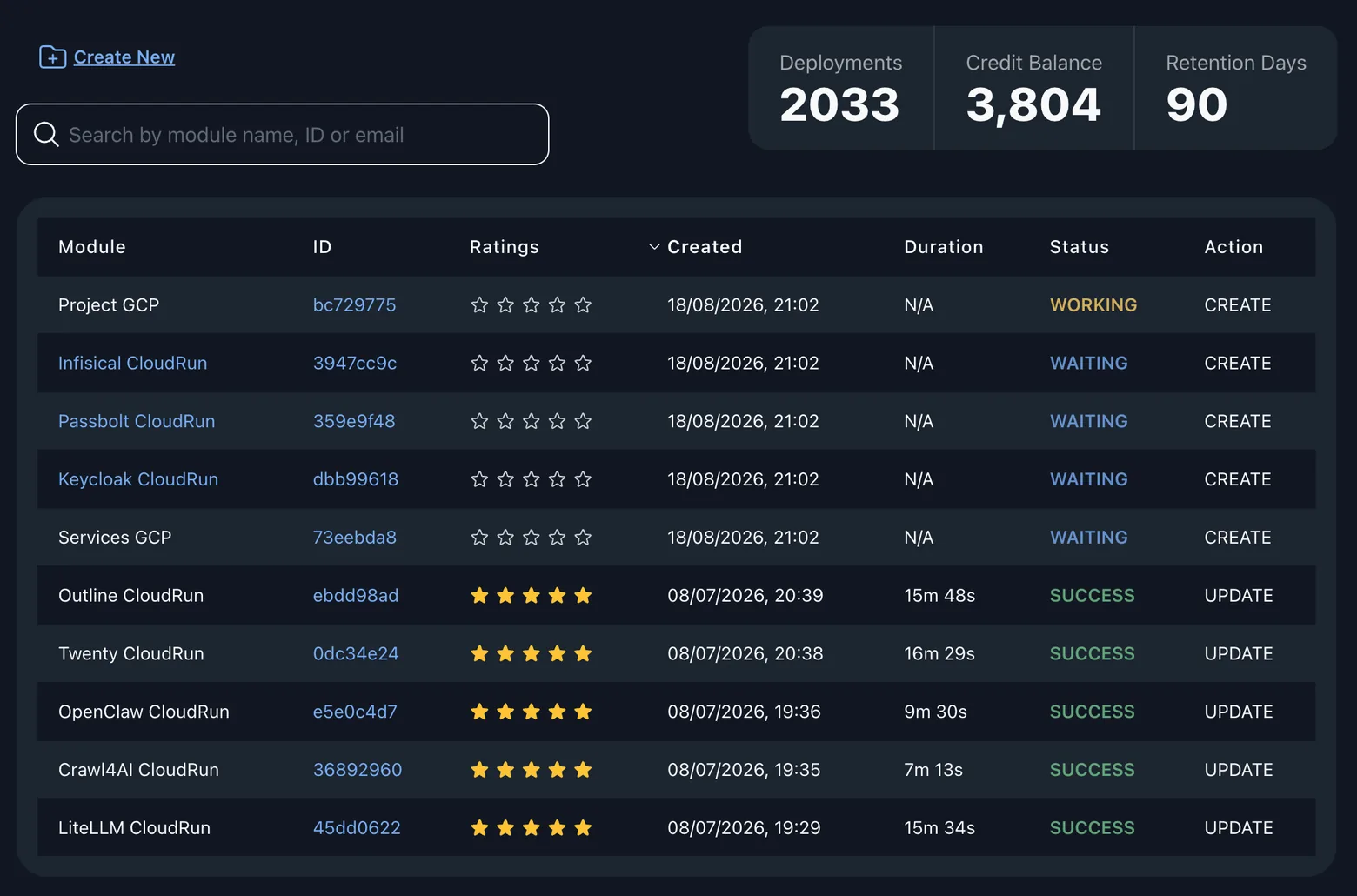
A deployment can be cancelled in either state, before it starts building. Cancelling one that is waiting also releases everything waiting behind it: nothing has built yet, so there is nothing to unwind.
RAD applies a retention period: once a deployment has been unused for longer than that period, and its owner has neither signed in within the window nor holds any purchased credits, RAD deletes the record and the Terraform state along with it. A warning email goes out to each user. Deployments in a RAD-managed project are exempt from the sweep entirely, as are the records of the managed projects themselves. Retention removes configuration records: your Google Cloud resources are untouched by it and stay running.
A solution is a bundle of applications deployed as a single dependency-ordered unit. Take one of the pre-composed ones, which hold between two and eight, or describe what you need and have RAD compose one of up to twelve.
Members without a dependency are queued the moment the deployment is confirmed, with up to four provisioning at a time by default. A member that consumes another member's outputs waits for the dependencies to be successfully deployed.
Where a wiring recipe is defined for a producer-and-consumer pair, the producer's outputs are read and written into the consumer's configuration before it deploys. Other members of a solution take their configuration from the form, and some may need manual configuration following deployment.
Destroying a bundle does not fire every teardown at once. A shared foundation is parked behind resources that depend on it. This ordering stops a project being deleted before its members. In a project RAD created, the shared services' teardown can fail while Google releases their network addresses; the project deletion that follows removes what remains.
Deployment credits for every member are reserved before the first member deployment starts, so a bundle cannot get halfway in and stop for want of balance. Multi-module solutions are discounted.
Rather than picking a pre-composed solution, describe what you are trying to build. RAD reads the catalogue and proposes a combination with a reason for each choice; you accept the ones you want. The saved set deploys through this same pipeline, and RAD wires a pair only where a recipe for it already exists.
Wiring is defined per producer-and-consumer pair. Additional configuration may be required after the deployment finishes. Examples are listed here:
Two targets, and the catalogue and engine are identical for both.
RAD deploys as a principal inside your Google Cloud project, subject to your organisation's policies and unable to widen them. Every Google Cloud region is available to you; region narrowing is a property of RAD-managed projects only. RAD holds and manages the deployment configuration, and the Terraform state used to deploy into your project is stored in RAD's own Cloud Storage bucket rather than in yours.
If you have no Google Cloud account, RAD creates a project for you in one of four tiers, each in its own Google Cloud folder with its own organisation-policy set. Creating one requires a verified email address and a minimum purchased credit balance for that tier, and you may hold one managed project per tier at a time. The project's Google Cloud spend is recharged to your credit balance, as Google reports it.
Separate folders are the point: a relaxation made for one tier cannot drift into another. Lab carries the sandbox policy set deliberately, in a folder of its own, so a cohort cannot reach into a customer's own sandbox.
One region in each of eight geographies. Each was picked as the cheapest available region in that geography, measured from the Cloud Billing Catalog API rather than chosen by reputation. africa-south1 is the only Google Cloud region on the African continent. In your own project none of this applies — you keep every region Google offers.
Mechanisms, not adjectives. These are the controls applied to the sandbox and lab tiers, which carry the tightest set.
The same credential-hygiene floors apply. An external IP is permitted only where OS Login and Shielded VM are in force; a publicly readable bucket only where uniform bucket-level access is on; a public database IP only through the Cloud SQL Auth Proxy, because authorised networks are blocked outright. Developers can configure enabled Google Cloud services.
Production is not the uncapped tier. It takes development's quota set wholesale: 48 Compute Engine vCPU and 32 Cloud Run vCPU per region, 32 GB of Memorystore Redis per region, 1 TiB of BigQuery scan per day. A value above one of those ceilings is refused when you submit the form, naming the ceiling it exceeded. Quotas can be increased on request.
Nobody picks the lab tier from a list — it appears on no deploy form. Only a lab session reaches it: a trainer creates one from the Lab sessions view of Managed Environments on the Solutions page, and each participant's environment lands in a lab project of its own. A session is paid for up front, by the trainer or by each participant buying a place, and unused credits return to the trainer; a place whose clock never starts is refunded to whoever paid for it. The project is deleted when the lab ends.
These access rules are enforced by the server on every request.
What you are allowed to do is read from your stored user record on the server, on every request — never from anything the browser sends. A modified client asks the same questions and gets the same answers.
A support agent can see your deployments only while a ticket of yours is assigned to them and still open. Resolving or closing it ends the access — at once in the console, and within five minutes on the API; reopening restores it.
Raw configuration values and deployment outputs are excluded from support access, as is anything destructive — support cannot tear down what it can see.
Credit grants, adjustments and revenue splits write an audit record, and cross-tenant support reads of a deployment's status, logs or credit history are recorded too.
Three separate mechanisms that are often collapsed into one word. They do different things and one of them does less than people assume.
You are charged for the resources needed to perform the deployment, measured from its real duration at a published per-hour credit rate. The cost is deducted once the build finishes, so you pay for the time it actually took rather than an estimate. The module fee is separate, and is shown for review before you confirm.
Each tier carries a monthly Google Cloud budget that raises alerts as spend approaches and then exceeds it. Those alerts reach our administrators and finance team, not the project's user, because the spend lands on our billing account. A budget notifies; it does not refuse an API call, and raising one permits no extra spend.
RAD is designed to disable billing on a managed project when the account's purchased credit balance falls below the minimum for the project's tier, or its Google Cloud usage goes unpaid, and to restore it once the balance is topped up. It checks on a fifteen-minute schedule, and only ever reverses a suspension it applied itself — never one you or Google put in place.
Better to read this now than to discover it in week three.
Every module targets Google Cloud. Governance spread thinly across providers, and the guardrails above exist because there is a tier based policy model to enforce them in.
If your platform standard is a different provisioning tool, RAD's output stays legible to you, but it will not be native to your pipeline — you would be adopting Terraform alongside what you already run.
RAD-managed tier's organisation policy may not permit some modules and solutions to be deployed into a RAD project. You can deploy these modules into a Google Cloud project you already control.
The catalogue, the deployment engine and the documentation are built and running. Newer parts may be early access and labelled as such on the pages that describe them. The console is available in English and French.
If your requirement is a small application and nothing else, a shared host will cost less than a governed Google Cloud project plus a module fee. RAD earns its price on estates, on governance you would otherwise build.
Everything above is the same whoever you are. What it is worth depends on what you deploy and how often — pick the closest fit.
One reviewed catalogue deployed into projects your organisation already governs, as ordinary Terraform.
The estate a product needs, in your own project or in a governed one RAD creates if you have no GCP account.
A real project and a real deployment per participant, provisioned for a cohort in one action. Early access.
Make your software deployable on Google Cloud from one form, or publish and deploy your own Terraform modules.
It is the fastest way to check any of this for yourself. Signing up gives you 300 credits and does not ask for a payment method.